


Manage Multiple Stores Without Running Between Branches
Owning more than one store means facing the same questions every day: which branch is running low on stock, whether prices have been updated at the other locations, and whether the cashier reports can be trusted. If all of that is still tracked by hand, or across separate apps, owners often find out about problems only when it is too late.
iREAP POS is built for exactly this situation. This Android point-of-sale app brings transactions, stock, prices, and reports from every branch into a single company account, and it keeps working when the internet goes down. According to its official website, iREAP is trusted by more than 500,000 businesses in over 100 countries.
This article walks through iREAP POS’s main features by the problem each one solves, with a focus on iREAP POS Pro, the version for multi-branch businesses. At the end you will find a comparison with the free Lite version, pricing, and how to get started.
A Cashier That Keeps Working When the Internet Is Down

A cashier that stops working because the signal drops means long queues and lost sales. iREAP POS Pro runs in hybrid mode (online and offline), so transactions can still be processed without an internet connection.
It works simply. When a connection is available, transactions, goods receipts, and goods issues are consolidated to the cloud right away. When the connection drops, data is stored temporarily on the device and synchronized automatically as soon as the internet returns. The cashier does not need to do anything.
Enter it once, and it applies to every store
Synchronization also covers master data. Store, user, product, customer, supplier, and price data can be managed from the Web Dashboard or the mobile app, then pushed automatically to every cashier device. Adding a new product or updating a price is done once, with no need to repeat it at each branch.
Role-based access
Each user is assigned to a specific store with access rights that match their role: Admin, Manager, Supervisor, or Cashier. The number of users is unlimited, and they can all take turns logging in on the same device. Each device is registered to a store once, so a cashier simply logs in with a username and password without choosing a store, and transactions cannot be mixed up between stores.
Best for: stores in locations with an unstable signal, or businesses that cannot afford to lose a single sale.
Complete Payments With QRIS and Customer Receivables
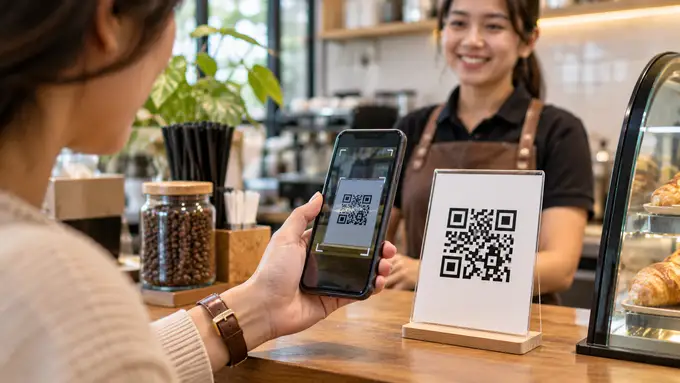
Customers now pay in many different ways, and a cashier needs to handle all of them without separate record-keeping. iREAP POS Pro supports multiple payment methods in a single transaction.
QRIS with automatic reconciliation
E-money payments through QRIS (Indonesia’s national QR payment standard) are integrated into the app, and reconciliation runs automatically. This reduces the manual work of matching digital payments against cashier records.
Receivables and billing with iREAP Invoice
For businesses that sell on credit terms, such as distributors and wholesalers, receivables and incoming payments are handled by the companion app iREAP Invoice, which integrates with iREAP POS Pro. It is also used by professional-services businesses that bill customers by invoice.
Sales Orders for orders fulfilled later
Not every sale is completed at the register. The Sales Order feature lets you record orders for a store or warehouse and process them later.
Flexible Pricing and Promotions at Every Branch
Selling prices are rarely identical everywhere. Location, customer segment, and purchase quantity often call for different rules. iREAP POS Pro offers four features to manage this without extra spreadsheets.
| Feature | What it does | Example use |
|---|---|---|
| Loyalty Program | Customers earn points and redeem them for discounts at checkout | Encouraging customers to come back |
| Customer Price Lists | Specific customers receive different prices | Special pricing for resellers or regular customers |
| Quantity-Based Discounts | Discounts apply according to the number of items purchased | Price breaks for bulk purchases |
| Different Prices per Store | One product can have a different selling price at each branch, set through the web admin | A mall branch versus a suburban branch |
All of these settings can be managed centrally, so the owner or head-office team does not need to contact each branch one by one to change a price. Two basic settings that people often ask about, tax inclusive/exclusive and rounding, also have their own guides.
Stock and COGS Control Across Every Branch

Unmonitored stock is a source of losses that often goes unnoticed: goods pile up at one branch while another runs out. iREAP POS Pro tracks stock in realtime and offers three features that help owners stay in control.
Inter-store stock transfer
Goods can be moved from one branch to another with the inter-store stock transfer feature. Movements between branches are recorded in the system. One iREAP customer, Regina Shoes, reports that restocking, which used to take up to a month when done manually, can now be done in realtime across branches.
Cost of goods sold (COGS)
COGS determines whether the profit shown in your reports is real. iREAP supports two methods: average cost and standard cost. Both are available in Pro and in Lite.
Recipes and product sets
For restaurants and cafes, the Recipe / Product Set (Sales Bill of Material) feature links the menu items you sell to the raw materials they use. Kedai Sutan Mangkuto, one of the users, says it can monitor kitchen ingredient usage and see sales results in realtime, even when away from the restaurant. The feature also suits bundles and product packages in retail stores.
Monitor Salespeople and Staff From One Dashboard

Businesses that sell through field salespeople, or that have many cashier staff, need a way to track performance without accompanying every person. iREAP POS Pro offers four features for this.
- Salesman Taking Order: salespeople take orders directly in the app. In the system, a field salesperson is counted as a mobile store connected to the main store for Sales Orders.
- Salesman Map with GPS Tracking: a salesperson’s position can be viewed on a map through the web admin.
- Employee Attendance: store staff record their attendance through the cashier app.
- Store and Salesman Expenses: operating expenses are recorded in the same system as sales, which gives a more complete profit report.
This combination makes iREAP relevant to distributors and wholesalers, not just retail stores. To understand the concept in more depth, iREAP also has an article on what a sales tracking app is (in Indonesian).
Realtime Reports From Anywhere

Good business decisions need current data, not an end-of-month recap. iREAP POS Pro provides two reporting routes.
- Web Dashboard at pro.ireappos.com: consolidated reports for all stores, accessible anytime from anywhere. Access for the owner and head-office team is free, with no extra fee.
- Reports in the mobile app: single-store reports, right from the cashier device.
Reports can be exported to CSV, Excel, and PDF for bookkeeping or presentations. iREAP users describe the benefits in different ways. Rakuni monitors more than 10 stores with realtime sales and stock reports, while Martabux uses information such as hourly sales and profit-and-loss reports to plan promotions.
Sales, profit, and stock can be checked directly on the dashboard, without waiting for reports from each branch.
iREAP POS Lite vs Pro: Which One Fits Your Business?
Choose Lite if you run a single store by yourself and want to start using the app right away without registration. Choose Pro if you already have cashiers or employees, own more than one store, or want to monitor your business from anywhere. The iREAP website suggests moving up to Pro when a store’s revenue exceeds IDR 25 million per month, or when you start hiring cashier staff.
Both versions come with no installation fee, no minimum contract, no limits on master data or transactions, and no ads.
| Feature | iREAP POS Pro | iREAP POS Lite |
|---|---|---|
| Price | Subscription (see pricing table) | Free |
| Users | Unlimited (Admin, Supervisor, Cashier, Manager) | Single |
| Stores | Multiple stores in 1 company account | Single |
| Cashier devices | Multiple devices | Single |
| Operating mode | Hybrid (online and offline) | Offline only |
| Data and master data sync | Automatic across all stores | Manual |
| Web Dashboard and consolidated reports | Yes, free for owners | No |
| Cashier (POS) and stock | Yes | Yes |
| COGS (average and standard) | Yes | Yes |
| Sales Orders, QRIS, multiple payment methods | Yes | No |
| Loyalty, customer price lists, quantity discounts, per-store pricing | Yes | No |
| Inter-store stock transfer, recipes/product sets | Yes | No |
| Salesman, GPS tracking, attendance, expenses | Yes | No |
| Export to CSV, Excel, PDF | Yes | No |
| Languages | English, Indonesian, Russian | English, Indonesian, Russian, French, Japanese |
iREAP POS Pro pricing
Pro uses a voucher system. One voucher covers one device and one app, and the number of users is still unlimited.
| Plan | Price | Approx. per day |
|---|---|---|
| 1 month | IDR 99,000 | IDR 3,300 |
| 3 months | IDR 199,000 | IDR 2,211 |
| 6 months | IDR 299,000 | IDR 1,661 |
| 12 months | IDR 500,000 | IDR 1,396 |
The 12-month plan works out to roughly IDR 42,000 per month per voucher. New users can try iREAP POS Pro free for 14 days. The prices above were taken from the official website as of November 6, 2026 and may change; check the pricing page for current figures.
Not sure how many vouchers you need? The iREAP website has a price calculator that works it out from your number of stores, cashier machines, and salespeople. If you only need a no-cost option, iREAP POS Lite is ready to try right away.
Which Types of Business Is It Suited For?
iREAP POS is used across many sectors, and the official website has a dedicated page for each type of business. Here is an overview of the most relevant features for each.
| Business type | Most useful features | Full guide |
|---|---|---|
| Minimarkets, small shops, grocery stores | Realtime stock, barcodes, sales reports | View page |
| Distribution, trading, wholesale | Salesman taking order, GPS tracking, receivables, customer price lists | View page |
| Eateries, cafes, restaurants | Recipes/product sets, ingredient monitoring, QRIS | View page |
| Fashion, boutiques, shoes, eyewear | Cross-branch stock, stock transfer, loyalty | View page |
| Franchise | Consolidated reports, per-store pricing, role-based access | View page |
| Salons, barbershops, workshops | Cashier, loyalty, reports, expense tracking | View page |
| Clinics and spas | Cashier, staff attendance, reports | View page |
For franchises, FRYDAY says iREAP helps both franchisors and franchisees monitor all of their outlets across Indonesia.
Get Started With iREAP POS Pro in 5 Steps
According to the iREAP website, the initial setup can be done in a few minutes.
- Download iREAP POS Pro from the Google Play Store and install it.
- Register from your Android device: set up your business, your first store, and the administrator user.
- Enter master data: products and prices, through the app or by uploading from the website.
- Start selling: use the app as your cash register.
- Check reports: monitor sales, profit, and stock in realtime from the web.
iREAP POS Pro can be tried free for 14 days. If you would like guidance, you can contact the iREAP team, who are available Monday to Saturday, 8:30 am to 5:30 pm (GMT+7).
Frequently Asked Questions (FAQ)
Can the iREAP POS cashier app be used without internet?
Yes. iREAP POS Pro runs in hybrid mode: transactions are still saved when the internet is down and are synchronized to the cloud automatically when the connection returns. iREAP POS Lite works fully offline and stores data on the device.
Can iREAP POS handle multiple stores or branches?
Yes, with iREAP POS Pro. All stores are managed under one company account, and consolidated reports can be viewed in the Web Dashboard. The Lite version supports a single store only.
How much does iREAP POS Pro cost?
IDR 99,000 for 1 month, IDR 199,000 for 3 months, IDR 299,000 for 6 months, and IDR 500,000 for 12 months, per voucher. One voucher covers one device and one app. Prices may change, so check the official pricing page.
Is there a free version?
Yes. iREAP POS Lite is free, with no limits on master data or transactions and no ads, for one user and one store. Pro can also be tried free for 14 days.
Does iREAP POS support QRIS payments?
Yes, in iREAP POS Pro. E-money payments through QRIS are integrated into the app and reconciled automatically.
Is the number of users limited?
No. In iREAP POS Pro, the number of users (Admin, Manager, Supervisor, Cashier) is unlimited, and they can all take turns logging in on the same device.
Can I monitor my salespeople in the field?
Yes. iREAP POS Pro includes salesman order taking and a salesman map with GPS tracking that can be viewed through the web admin.
Can reports be exported?
Yes. Reports in iREAP POS Pro can be exported to CSV, Excel, and PDF.
Time to Monitor Every Branch From a Single Screen
iREAP POS Pro’s features address three core problems of multi-branch businesses: a cashier that must keep running, stock and prices that must stay consistent, and reports that must be trustworthy and viewable at any time. For a single-store business, the free Lite version is enough to get started.
The easiest way to judge the fit is to try it directly:
- Try iREAP POS Pro free for 14 days on Google Play.
- Contact the sales team via WhatsApp at +62 813-8758-0123 or email support@ireappos.com.

About